Create a Test Case
Use New Test Case to add a reusable check to the project repository. If a suite is selected first, the new case is created inside that suite.
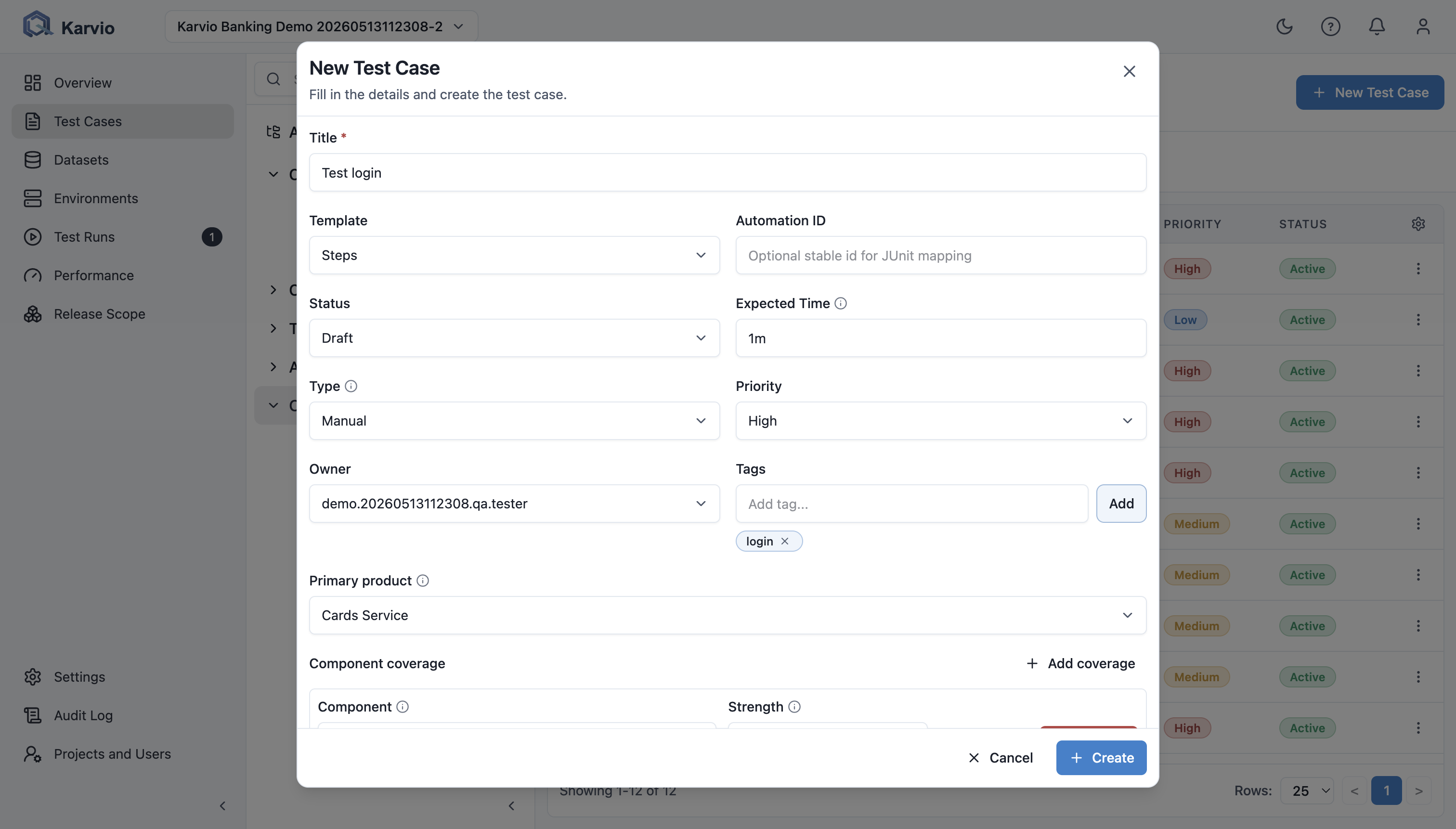
Main Fields
| Field | Purpose |
|---|---|
Title |
Required behavior-focused name. |
Template |
Case format: Text, Steps, or Automated. |
Automation ID |
Stable automated-test identifier for import matching. |
Status |
Draft or Active during UI creation. |
Expected Time |
Manual execution estimate such as 10m, 1h, or 00:15:00. |
Type |
Manual or Automated; the automated template fixes the type to Automated. |
Priority |
Low, Medium, High, or Critical. |
Owner |
Project member responsible for maintaining the case. |
Tags |
Labels for search, filtering, and reporting. |
Primary Product |
Main product covered by the case. |
Component Coverage |
Components, coverage strength, and release-mandatory status. |
Text Template
Use the text template for compact manual checks:
Preconditionsstores setup and assumptions.Stepsdescribes the execution flow.Expecteddescribes the expected outcome.
Example: User can reset password from login page is a short smoke case where preconditions and expected behavior matter more than a long step list.
Steps Template
Use the steps template for strict manual procedures. Each step stores:
- action;
- expected result;
- order controls for add, insert, remove, and move;
- inline images and step attachments.
Structured steps reduce ambiguity when several testers execute the same flow.
Automated Template
Use the automated template for source snippets or machine-readable test definitions:
Raw Teststores code or source content.Languageidentifies the source format.Automation IDlinks future imports to this case.
Automation engineers should keep automation_id stable across refactors.
AI-Assisted Drafts
When AI is enabled for the project, the create form includes an AI source area. Users can paste feature notes, acceptance criteria, bug reports, or risk context and generate draft cases.
Generated cases are suggestions. Review title, steps, expected result, coverage, and tags before saving.
Component Coverage
Coverage links a test case to the product model:
Primary Productsets the main product.- Each coverage row selects a component.
Strengthcan beSmoke,Regression, orDeep.Mandatorymarks a case as required for release coverage.
Example: a checkout end-to-end case can cover Cart UI, Payment API, and Orders Service, with Payment API marked mandatory for release readiness.