Test Cases
Test Cases is the project repository for reusable manual, structured, and automation-linked checks. Use it to keep test logic, ownership, priority, component coverage, datasets, attachments, result history, and Jira context in one maintainable place.
What This Section Covers
Test Cases supports these workflows:
- QA leads break down features into suites and reusable checks.
- Manual testers maintain preconditions, steps, expected results, and attachments.
- Automation engineers map automated checks with a stable
automation_id. - Release managers review product and component coverage.
- Defect analysts open result history, logs, artifacts, and linked Jira issues from the case.
- Teams reuse one test case across many input combinations through datasets.
Subsections
- Test Suites
- Create a Test Case
- Test Case Detail
- Bulk Operations, Permissions, and API
- Scenarios and Practices
Test Cases Registry
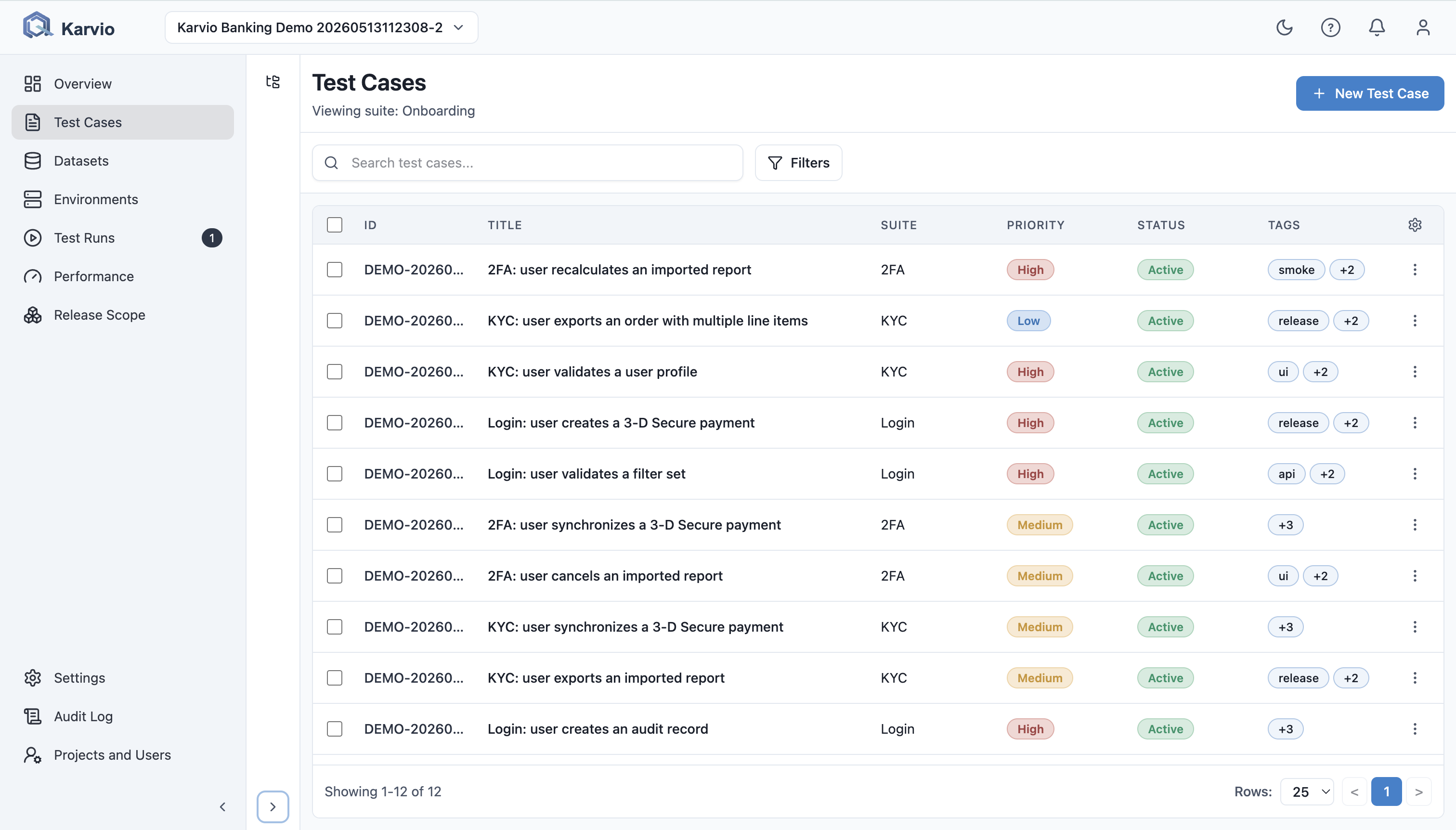
The Test Cases screen has three primary areas:
- Suite tree on the left organizes cases by stable product or testing areas.
- Toolbar provides search, filters, create action, column visibility, bulk actions, and export.
- Table shows cases with configurable columns, sorting, pagination, and row actions.
Table Columns
| Column | Shows | Why It Helps |
|---|---|---|
ID |
Case key such as TC-123 |
Gives the team a stable reference for Jira, Slack, and reviews. |
Title |
Behavior under test | Communicates the intent of the case. |
Suite |
Repository folder | Shows the functional area. |
Priority |
Low, Medium, High, Critical |
Helps select smoke and release-critical checks. |
Type |
Manual or Automated |
Separates human and automation-owned checks. |
Status |
Draft, Active, Archived |
Shows whether the case is ready for execution. |
Tags |
Free-form labels | Enables cross-cutting filters such as smoke, mobile, or pci. |
Owner |
Responsible user | Clarifies review and maintenance ownership. |
Last Run |
Latest execution and result | Helps find recently failing or stale checks. |
Users can choose visible columns, sort supported columns, and change page size to 10, 25, or 50.
Search, Filters, and Sorting
Search matches case key, title, and tags. UI filters cover:
- status:
Draft,Active,Archived; - priority:
High,Medium,Low; - suite selection from the suite tree.
The API also supports owner, tags, products, components, and minimum component risk filters.
Example: before a regression pass, a tester selects the Checkout suite, filters to Active, sorts by Priority, and starts with high-priority scenarios.
Row Actions
Each row supports:
Opento view the case;Editto open it directly in edit mode;Deleteto remove it after confirmation.
Deleting a test case is destructive and also cleans up its case-owned attachments.
Export
The toolbar Export control downloads test cases in TMS-compatible formats (CSV, TestLink XML, Xray/Zephyr JSON, JUnit XML, or JSON). With rows selected, only those cases are exported; with no selection, the current suite, filters, and search define the scope, so an unfiltered view exports the whole project. See Bulk Operations, Permissions, and API for the full scope rules and the 10,000-case limit.